Summary
- Mastering portals is crucial for success in Splitgate 2; practice smart strategies for flanking and control.
- Optimize game settings for improved performance and gameplay experience on PC; adjust keybinds for portal precision.
- Utilize enemy portals to reveal enemy positions, disable them, and gain an advantage during matches.
Splitgate 2 has portalled its way to PC and console, bringing players another free-to-play title to dive into. Those jumping into this arena first-person shooter can engage in competitive action across a variety of game modes, including the game’s own unique take on Battle Royale.
Splitgate 2 is definitely a fun and unique FPS, but it also comes with a high skill ceiling. As matches become increasingly competitive, players looking to improve will need to employ smart tactics to stay ahead of the competition. Fortunately, here’s a list of beginner tips and tricks to help players get better at Splitgate 2.
1 Learn To Portal Effectively
Portals Are The Foundation Of Splitgate 2
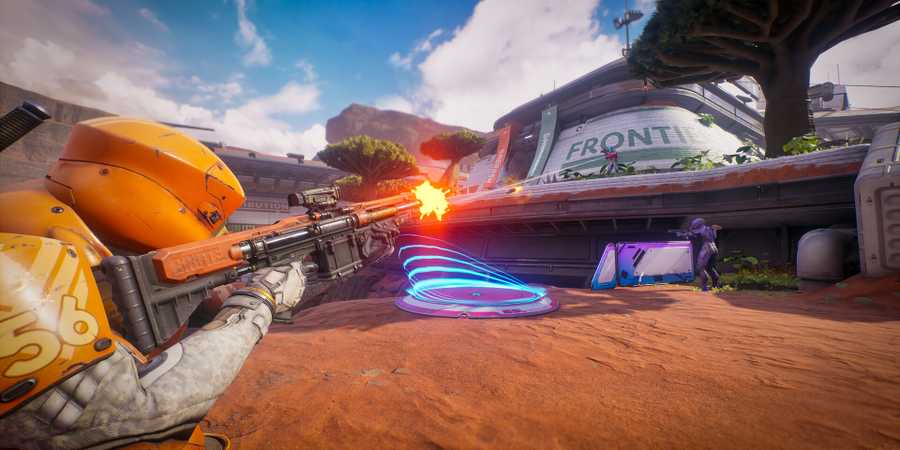
Splitgate 2’s defining feature is its portal system, and mastering it is essential for success. Portals can be used in a variety of strategic ways—from quick traversal and flanking to creating unexpected vantage points for ambushes. One of the first things players should learn is how to place portals effectively. Portals can be placed on the distinct blue surfaces found throughout each map, and only a small portion of the surface needs to be in view to create one.
From there, players can begin developing smart portal strategies. Common tactics include portaling behind enemies for flanks, setting up portals to monitor enemy-controlled areas, shooting through portals to control objectives from a distance, or using portals to return to key points on the map quickly. Each placed portal also remains visible on the HUD, making it easy to track where each portal leads at all times.
Another important tactic is knowing when to close portals. For example, if players need to escape a firefight, they can portal away and immediately close the portal to prevent enemies from following. Portals can also be used for baiting, such as faking a retreat and looping back around for a surprise attack. The possibilities with portals are nearly endless, so experiment and practice to get more accustomed to the mechanic.
2 Optimize Game Settings
Having Optimal Settings Can Improve FPS & Gameplay
When it comes to any first-person shooter, optimizing settings is a simple yet effective way to improve both performance and overall gameplay experience. While console players are largely limited to preset configurations, PC players have greater flexibility when it comes to tweaking their setup in Splitgate 2. For improved performance and fps, it’s recommended to lower the Scalability settings to Low or Medium, depending on the system. However, for the best gameplay experience, View Distance Quality, Portal Frame Rate, and Portal Quality should all be set to Ultra or High.
When it comes to keybinds and controller configurations, preferences will vary from player to player, but some universal adjustments can be useful. A highly recommended change is to bind separate keys or buttons for Create Portal Left and Create Portal Right, which provides more precise control over portal placement. The same logic applies to the Close Portal keybinds. A higher FOV is also recommended to improve visibility. For a more detailed breakdown of optimal settings, check out our full Splitgate 2 settings guide.
3 Use Enemy Portals To Your Advantage
Enemy Portals Can Be Used Just Like Any Other
While enemy portals cannot be seen through like the player's own, they can still be used and shot through just like any other, allowing players to turn them against their owners by keeping two key tips in mind. For starters, enemy portals can reveal enemies on the other side. Portals with enemies close by will give off a unique humming sound and also flicker. This allows players to both hear and spot from a distance whether an enemy is potentially looking through or lying in wait near their portal, letting them plan accordingly.
Players can also use their reticle to identify enemies through their own and enemy portals. If players place their reticle onto an obscured portal and notice it turns red, it means there’s an enemy in their crosshairs. Using this strategy will more than likely lead to some neat kills, but there’s more.
Players can also disable enemy portals by placing their own in the same spot. This can be used to cut off flank routes and can also stop an enemy from fleeing through their portal by simply placing one closed portal in its place, forcing them to run straight into a wall.

How To Get Kickoff Medal In Splitgate 2
A great beginning to a match will never be left unnoticed in Splitgate 2.
4 Pay Attention To The Mini-Map
The Mini-Map Gives Off Key Information

The minimap in Splitgate 2, particularly in its roster of arena modes, is one of the most powerful tools in a player's arsenal—and it’s accessible to everyone. Much like in other arena shooters, nearby players are indicated by a red dot on the minimap, regardless of whether they are firing or not. This gives players an effective way to keep tabs on enemies attempting to sneak up or rush before they even come into view.
On the other hand, enemies who are relatively close but not within range of appearing as a dot will instead be highlighted in red on the edge of the minimap. This allows players to track the general direction of enemy movement, which can be great for securing more eliminations or anticipating potential flanks.
5 Build Up & Maintain Momentum
Fluid Movement Is Everything In Splitgate 2
In Splitgate 2, players can build and then carry their momentum to increase the speed and fluidity of their movements, allowing them to pull off some rather neat plays. Sliding is one way to increase momentum and is particularly handy when used down slopes and stairs. Feathering the jetpack to avoid wasting all the fuel at once is also a useful trick to boost momentum while moving forward in midair, while also ensuring there is still fuel left over.
Portals can also be used to carry momentum. Falling through floor-based portals from height, or boosting through wall-based portals, allows players to retain the speed they gained. Players can even chain this together with other movement techniques, such as feathering the jetpack or sliding upon landing, to carry that momentum even farther.
6 Aim For The Head
Headshots Lead To Quick Eliminations

Aiming high and securing headshots is a common practice in first-person shooters, and implementing this same strategy in Splitgate 2 will surely lead to more victories across all modes. Just like in any other shooter, headshots in Splitgate 2 allow players to dish out more damage with each shot, leading to a quicker kill.
The amount of damage headshots deal is purely dependent on the type of weapon the player is using, with Carbines and Burst Rifles dishing out more damage per bullet than full-auto weapons like Assault Rifles and Submachine Guns.
To accurately land headshots, players should keep their reticle high and at the level where they expect the enemy’s head to be. Adjusting for potential recoil is also a good practice. For instance, when using burst weapons, aim closer to the neck to account for vertical kick, allowing more shots to land on the head.
7 Don't Be Afraid To Melee
Sometimes Meleeing Is More Effective Than Shooting
Players coming from both Splitgate and potentially Halo may already be aware of just how devastatingly effective melees can be in Splitgate 2, but for newcomers, here is a rundown of how melees work.
For starters, by default, it takes two standard melee hits to eliminate an enemy at full health, and players are given a slight lunge effect when performing a melee on an enemy, making it relatively easy to land one when close enough to the target. Both of these aspects often make meleeing up close a better alternative than firing a weapon. However, it can be even more effective when chaining together a few shots and finishing with a melee, or vice versa.
However, while meleeing is generally a two-hit kill, there are ways to land a one-hit melee kill on enemies at full health. The first is to boost the player’s momentum as the melee is delivered. Making use of the jetpack, sliding down slopes, and even jumping through fall-placed portals are all ways to boost momentum significantly. The second method is to use the BFG, which is a one-hit melee kill as long as it has ammunition. For players looking to shorten the delay between melees, also be sure to equip the Melee Knuckles attachment on primary weapons.
8 Secure Power Weapons
Power Weapons Are The Strongest Items Available
While a player's standard loadout will typically serve as their primary option for most of the match, Power Weapons offer a major tactical advantage and can significantly influence the outcome of a game. These unique and high-impact weapons spawn periodically throughout arena matches, with their locations and respawn timers clearly marked on the player’s HUD. They’re highly contested, but generally spawn in pairs at different locations, with the specific weapons available often rotating as the match progresses.
Some of the Power Weapons players can get their hands on include the BFG, a one-hit-kill melee weapon; the Borealis, a charge-up Marksman Rifle; the Fubar Rocket Launcher; the Deadbolt Sniper Rifle; and the Splitstream, a dual-wield Submachine Gun. Each weapon is distinct in function and incredibly powerful, with some also having their own hidden fire modes and abilities to learn. Securing them can be the key to turning the tide of battle, leading to swift eliminations and, potentially, a match-winning edge.









- Developer(s)
- 1047 Games
- Engine
- Unreal Engine 5
- Platform(s)
- PlayStation 5, PlayStation 4, Xbox Series X, Xbox Series S, Xbox One, PC
- OpenCritic Rating
- Fair