


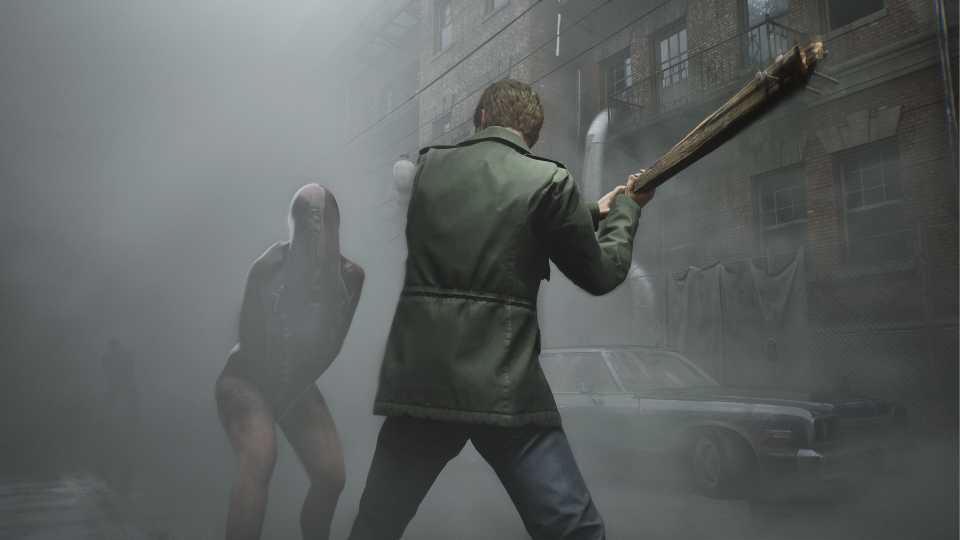
The recent release of the Silent Hill 2 Remake on PS5 and PC has been a major success for its studio, receiving positive reviews from both fans and critics. However, some criticism has been directed at the game's performance, with many players finding it demanding on hardware.
This isn't surprising, as the highly anticipated remake is built using Unreal Engine 5, known for its heavy hardware requirements. If you're a player looking to maximize your framerate in Silent Hill 2 Remake, you’ve come to the right place. The guide below outlines the visual settings that will help you achieve a higher framerate while still enjoying the game's breathtaking visuals.

Optimized PC Graphics Settings For Until Dawn
Discover the best optimized PC graphics settings for Until Dawn to enhance performance and visuals while enjoying this thrilling game.
Recommended Display Settings For Silent Hill 2 Remake

The display settings in Silent Hill 2 Remake offer various crucial options that should be configured correctly; otherwise, you risk making your game look blurry and grainy. You can also boost performance significantly by utilizing one of the many upscaling technologies available.
|
Graphical Option |
Description |
Recommended Setting |
|---|---|---|
|
Screen Mode |
This setting determines if the game utilizes the entire screen of the monitor or only a portion of it. Choosing Borderless allows you to smoothly Alt + Tab out of the game. |
Borderless |
|
Resolution |
This setting determines the resolution of the game. Selecting anything below Native will make the game extremely blurry. |
Native |
|
Raytracing |
This setting determines if Ray Tracing technology is used or not. It has a massive impact on both visuals and performance. Only turn on if you have hardware power to spare. |
Off |
|
Frame Rate Cap |
This setting determines whether an in-game FPS cap is applied. The available options are Off, 30, and 60. |
Personal Choice |
|
Dynamic Resolution |
This setting ensures that the game automatically adjusts the visuals to maintain the specified FPS target. |
60 |
|
VSync |
This setting eliminates screen tearing but limits the FPS to your monitor’s refresh rate and introduces slight input lag. Silent Hill 2 Remake is not a game that requires fast response, so consider turning it on to get the image without tearing. |
On |
|
Supersampling |
This setting determines if upscaling technology is used or not to improve the game's framerate. Select FSR 3.0 as DLSS causes ghosting in this game. |
FSR 3.0 |
|
Supersampling Preset |
This setting determines the resolution that the upscaling technology will use. Users playing at 1080p should avoid going below Quality, as this will result in a blurry image. |
Quality (1080p) / Balanced (1440p) |
|
Global Motion Blur |
This setting determines whether object-based motion blur is applied during cutscenes and gameplay. It’s best to enable this option only if you're experiencing a low framerate. |
Off |
|
In Game Motion Blur |
This setting determines whether object-based motion blur is applied during gameplay. It’s best to enable this option only if you're experiencing a low framerate. |
Off |
|
Graphical Mode |
Choose between either the default or 90s graphic mode. The latter is perfect for a second playthrough. |
Default |

How to Get the Handgun in Silent Hill 2
The Handgun can make combat in Silent Hill 2 a whole lot easier. Here’s how you can get this weapon early on in your playthrough.
Recommended Quality Settings For Silent Hill 2 Remake

Silent Hill 2 Remake features a robust graphics quality settings page, accessible by clicking on the Advanced Quality Settings option in the Display & Graphics tab. Here, you can gain a significant performance boost with minimal framerate loss, bringing you closer to the coveted 60 FPS mark.
|
Graphical Option |
Description |
Recommended Setting |
|---|---|---|
|
Anti-Aliasing |
This setting determines which anti-aliasing technology is used. FXAA can make the game appear blurry, while TXAA offers the best compromise between visual clarity and performance. |
TXAA |
|
Resolution Scalability |
This setting determines whether the resolution is scaled up or down. It’s recommended to choose Native, as selecting a lower resolution will result in a blurry image. |
100% |
|
Shadows Quality |
This setting determines the quality of shadows in the game. Selecting Low provides a significant performance improvement. While you may lose some shadows, the FPS gain is worth it. |
Low |
|
Textures Quality |
This setting determines the quality of textures in the game. It has no impact on performance as long as the GPU VRAM limit isn't reached. |
High |
|
Shaders Quality |
This setting determines the quality of shaders in the game. It's recommended to keep it on High; otherwise, you'll encounter excessive shimmering effects. |
High |
|
Effects Quality |
This setting determines the quality of various effects in the game. It's best to keep it on Max, as our testing showed no noticeable impact on performance. |
High |
|
Seperate Translucency |
This setting determines whether translucent objects are rendered in a separate pass or not. |
High |
|
Lens Flares |
This setting determines the quality and quantity of Lens Flares in the game. |
High |
|
Global Motion Blur |
This setting determines whether object-based motion blur is applied during cutscenes and gameplay. It’s best to enable this option only if you're experiencing a low framerate. |
Off |
|
SSAO |
This setting determines whether Screen Space Ambient Occlusion is used or not. Turn it on as it has very little impact on performance. |
On |
|
SSR |
This setting determines whether Screen Space Reflections are used. It's advisable to disable this feature, as the game's implementation isn't impressive. |
Off |
|
SSS Quality |
This setting determines the quality of light that simulates through translucent or semi-translucent surfaces. |
High |
|
Image Sharpening |
This setting determines the strength of the sharpening applied to the visuals. Some players prefer no sharpening, while others may opt for a more sharpening effect. |
Personal Choice |

Silent Hill 2 Remake: How To Access Pre-Order Bonus and Deluxe Edition Content
Learn how to access the Silent Hill 2 remake's pre-order and Deluxe Edition content, including masks, the digital artbook, and the soundtrack.
PC System Requirements for Silent Hill 2 Remake

The Silent Hill 2 Remake is developed using Unreal Engine 5, which suggests that the game won't be easy on hardware. However, the game more than justifies its high system requirements with its stunning visuals. Bloober Team has put a tremendous amount of effort into the game's visuals, and it shows. The system requirements have also been revealed, and they are sure to make some players nervous.
- Like most modern games, you’ll need Windows 10 64-bit or later as your operating system.
|
PC Specs |
Minimum Requirements |
Recommended Requirements |
|---|---|---|
|
Resolution / Frame Rate |
1080p @ 30 FPS |
1080p @ 60 FPS or (4K with DLSS or similar upscaling technology) |
|
Graphics Preset |
Low / Medium Quality Settings |
Medium Quality (60FPS) or High Quality (30FPS) |
|
Processor |
Intel Core i7-6700K or AMD Ryzen 5 3600 |
Intel Core i7-8700K or AMD Ryzen 5 3600X |
|
Memory |
16 GB RAM |
16 GB RAM |
|
Graphics |
NVIDIA GeForce GTX 1070 Ti or AMD Radeon RX 5700 |
NVIDIA GeForce RTX 2080 or AMD Radeon 6800XT |
|
Storage |
50 GB of SSD storage |
50 GB of SSD storage |
If you're considering playing the Silent Hill 2 Remake at 4K @ 60 FPS with max settings and no upscaling technology, then there's some bad news for you. Even the RTX 4090, the best gaming GPU currently on the market, can't run the game at those settings. However, future GPUs, such as the highly anticipated RTX 5090, may achieve that currently unattainable goal, providing high-end users with another reason to revisit this incredible-looking title.


Silent Hill 2


-
 OpenCritic Reviews
- Top Critic Avg: 87 /100 Critics Rec: 94%
- Released
- October 8, 2024
- ESRB
- M For Mature 17+ // Blood and Gore, Language, Sexual Themes, Violence
- Developer(s)
- Bloober Team
- Publisher(s)
- Konami







WHERE TO PLAY




- Engine
- Unreal Engine 5
- Franchise
- Silent Hill
- Platform(s)
- PlayStation 5, PC
- OpenCritic Rating
- Mighty
