


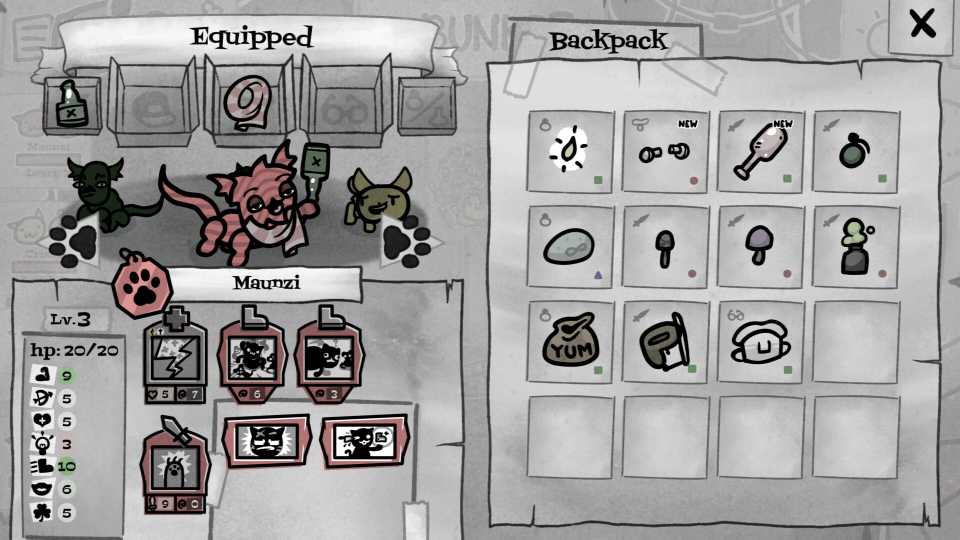
As you make your way through Mewgenics, you'll get an increasing number of items that are capable of turning the tide of battle. Just because you've found them on one run, though, doesn't mean you need or even want to use them there and then. Fortunately, you can keep them in your inventory and wait until another run to use them. However, as you work your way through the game, you'll find that your inventory space is rather limited and fills up quite quickly. That's when you'll likely want to know how to increase inventory space in Mewgenics, so here's what you need to know.

How to Gain Mana Fast in Mewgenics
Players wondering how to restore their cats’ Mana in Mewgenics can use this guide.
How to Increase Inventory Size in Mewgenics
Inventory size can be increased by giving 20 cats to Butch at a time to reach his next 'reward tier.' However, it's worth noting that Butch will only want cats that have reached new areas in the world each time you hit one of these reward tiers. For example, in the first instance, he'll be happy taking 20 cats that have visited either the Sewers or the Junkyard, before then wanting cats that have reached the Caves or Boneyard.
This means that you'll need to successfully reach these areas at least five times before you'll have enough cats to meet Butch's batch requirements. It's worth noting that you don't want to just get rid of any of your cats that meet Butch's strict criteria. Keeping some of your high stats cats, or those with really strong ability combinations, is recommended, as these will allow you to breed even stronger kittens.

Each time you complete one of Butch's batch cat deposits, you'll increase your inventory size permanently. This helps manage your item storage a little bit easier.
Using Trash Slots to Temporarily Keep More Items in Mewgenics (& Get Rid of Items)

While the trash slots might sound like they... Well... Trash items, they can also be used to temporarily give yourself a bit more capacity for keeping hold of items for one in-game day.
At the beginning of a day, buy any items from Tracy's Paw-Mart that you want to with your coins. Anything that you're not going to use on the run that day, move to the trash slots. Then go ahead and start your adventure and equip any useful items for the quartet of cats you're taking with you to them. You'll now have some free space in your Backpack for items you buy from Tracy's shop on the run, or items you find from chance encounters or winning battles.
When you return home after beating the boss (or failing the run), you can then open your inventory and move the items you put in the trash slots back into the standard storage slots.
Make sure that you move the items out of the trash slots back into the storage before you end the day, otherwise they'll permanently be lost.
If you're done with certain items and just need to get rid of them, move them to the trash slots and end the day to remove them permanently and free up some more space.


- Released
- February 10, 2026
- Developer(s)
- Edmund McMillen, Tyler Glaiel
- Publisher(s)
- Edmund McMillen, Tyler Glaiel
- Number of Players
- Single-player
- Steam Deck Compatibility
- Unknown


WHERE TO PLAY

- Genre(s)
- Tactical, Turn-Based Strategy, RPG
