


Gaming mice have to do a lot to stand out from the hundreds of competitors there are today. However, the Corsair Dark Core RGB Pro SE has an interesting design that is packed with features and specs that make this mouse hard to pass up after taking a look at it.

Corsair Dark Core RGB Pro SE
- Acceleration
- 50G
- Brand
- Corsair
- Weight
- 133g
- Sensor and DPI
- PixArt Paw3392, 18,000 DPI
- Switches
- Omron
The Corsair Dark Core RGB Pro SE is a high-performance gaming mouse that offers both flexibility and performance all in one aesthetically pleasing package. Get the most out of a wireless mouse with the SE's pinpoint accurate technology and precision with the PixArt PAW3392 DPI optical sensor. The SE charges with a versatile USB-C charger in less than two hours, offering a battery life of over 50 hours per charge.
For the past two weeks before writing this review this Dark Core RGB Pro SE was used for both working and gaming.
The mouse was tested in the following ga mes
- RoboQuest
- Barony
- Monaco
- Slime Rancher 2
Contents Of The Box

- Corsair Dark Core RGB PRo SE
- USB-C Cable
- Wireless Dongle
- Optional Side Grip
- Quick Start Guide
After unboxing the mouse, getting it ready to game is pretty straightforward. For first-time setup, it is recommended to connect with the included USB-C cable, so you can complete a surface calibration and save up to 3 profiles for quick switching.
If you plan to use this on one surface most of the time, the surface calibration makes a surprising difference, which we will review in more depth later.
Design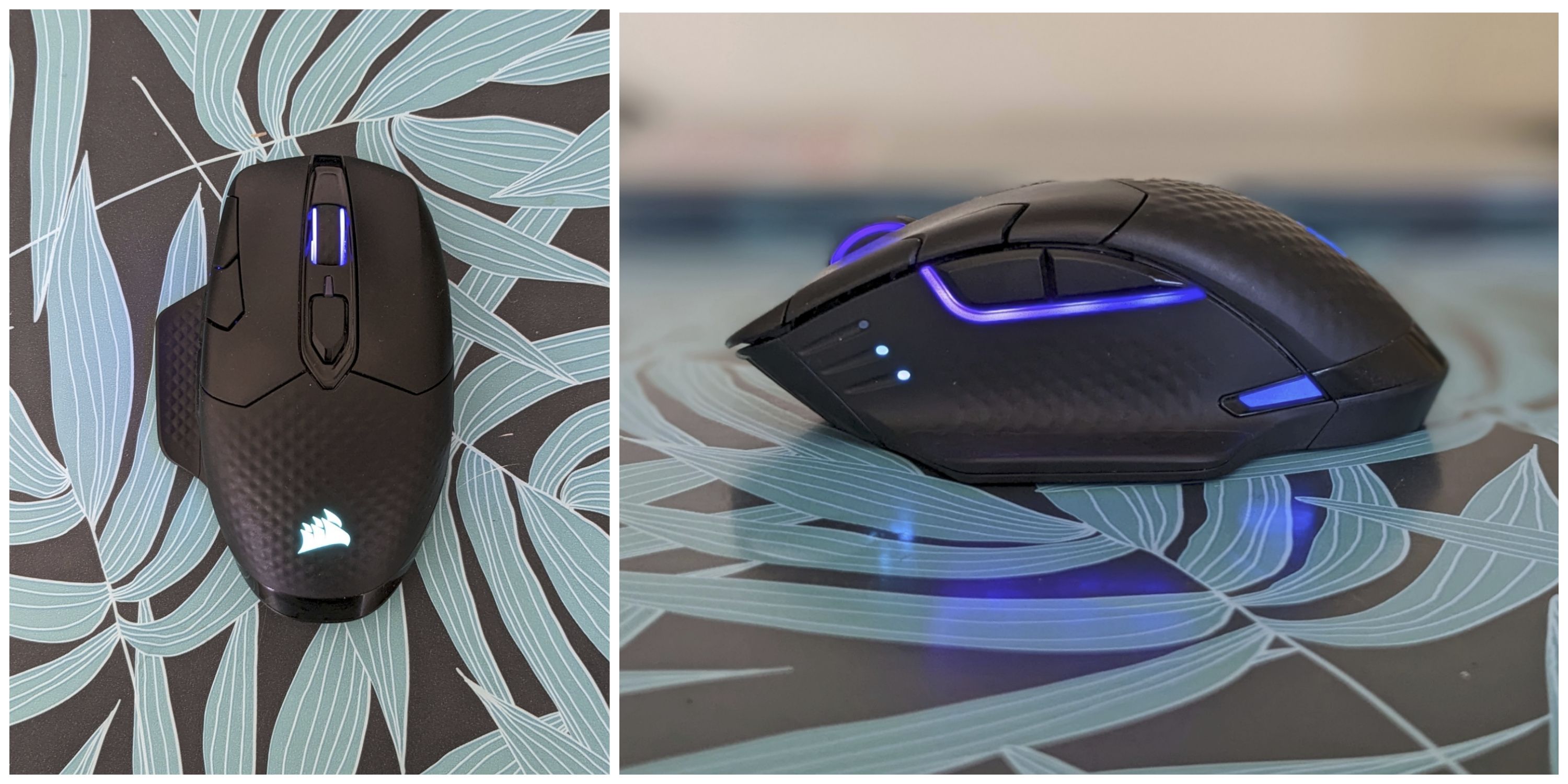
|
Weight |
132 grams |
|
Length |
5.0" |
|
Width |
3.2" |
|
Height |
1.7" |
The Corsair Dark Core RGB Pro SE is a medium-sized mouse with 8 programmable buttons, incredible RGB lighting, and a shape that offers a comfortable spot to have your hand for hours at a time. The back palm rest has slight knurling that helps prevent those nervous sweats from interfering with a competitive gaming session. However, you may be able to tell from my game selection above that I cannot handle competitive games as a person. The textured grip is continued on the left-hand side and the scroll wheel.
For people who plan to take this mouse on the go, the USB dongle fits neatly into the right-hand side underneath a magnetic cover that can double as an extra grip rest for your pinky. While this is not for everyone, people with smaller hands might enjoy it since your pinky has a place to rest besides on the desk.
RELATED:
Overall this mouse feels very well-built; there is no flex in the plastic, even when you are clicking hard. The feet slide smoothly across various surfaces, including wood and vinyl, if you are one of those people who doesn't want to use a mouse pad.
Button Layout Of Dark Core RGB Pro SE
|
Key Information |
|
|---|---|
|
Buttons |
8 Programmable Buttons |
|
Switches |
Omron |
|
Dominant Hand |
Right-Handed |
|
DPI Button |
Yes |
|
Sensitivity Clutch |
No |
|
Onboard Memory |
Yes (3 Profiles) |
The Dark Core RGB does not have a ton of programmable buttons, 6 in total, not including the left and right-click buttons. Technically you can remap the left and right-click buttons using Corsair's iCue software. These buttons can be remapped to pretty much whatever you would like, from typical mouse functions to keystrokes.
You can save up to 3 profiles with the Dark Core's onboard memory. You can change the lighting effects, programmed buttons, and DPI settings on these profiles.
Comfort

The Dark Core RGB Pro SE is an incredibly comfortable mouse. I typically use a Logitech G305, which is an excellent mouse, but the ergonomics do not hold up to the Dark Core at all. The shape and size of this mouse made it easy to have longer gaming sessions without hand cramps. The thumb rest keeps your thumb in a comfortable position and primed to press those two side buttons without much movement needed.
Both palm and claw grip users can use this mouse comfortably, but the palm grip feels better for longer sessions. If you have smaller hands, this mouse might feel a little large, but the included pinky rest makes it easier to support your hand.
The back palm rest arches to fit your hand perfectly, and it slopes gently all the way to the bottom of the mouse. So even in a palm grip, you can rest your wrist on the desk instead of hovering on top of the mouse. While this mouse is not really sold as an ergonomic mouse, I would rank it pretty high with other ergonomic-specific mice I have used, and the gaming performance is way better on the Dark Core.
Sensor Performance

|
Sensor Type |
Optical |
|
Sensor |
PixArt PAW3392 |
|
DPI |
100-18,000 DPI |
|
IPS |
450 |
|
Max Polling Rates |
2,000 Hz |
The PixArt PAW3392 sensor in this mouse supports up to 18KDPI and has a max polling rate of 2,000Hz. Most of the time, I found myself using this mouse at 6,000 DPI, but even when jumping up to 18K and going all the way down to 100, it was accurate and felt very responsive.
Using the iCue software, you can change DPI by 1 degree to fine-tune what setting works best for you. The sensor is slightly off-center, which didn't produce many problems in our testing, but for people looking for pinpoint accuracy this sensor placement might create some issues.
The minimum liftoff distance is 2.4mm, which is the distance at which the mouse will stop tracking the sensor location. This is not as low as some mice, like the Model O Wireless Glorious with 1mm, but in real-world testing, the difference between the two is negligible.
Connectivity and Battery Life
Using this mouse in 2.4GHz wireless and wired mode will give you the most consistent results while gaming. Bluetooth, on the other hand, leaves some performance to be desired. You have access to the full range of DPI and polling rate while connected via Bluetooth, but the accuracy and response time is inconsistent.
We would not recommend using Bluetooth mode for intense gaming, but it is nice to see on a mouse like this, making it much more accessible to laptop users that might not have a spare USB A port.
After two weeks of consistent use, I only ended up having to charge this mouse twice. The battery indicator is right by the scroll wheel, which made it easy to quickly gauge how much battery I had left without having to dig into the software.
The Dark Core RGB recharges through a USB-C cable, so even at times when I didn't have the included cable, I just used whatever USB-C cable I had with me, and it worked like a charm. All wireless rechargeable mice that haven't switched over to USB-C yet are truly missing out.
Software

Corsair's iCUE is an excellent piece of software. It not only offers a very intuitive way to customize your Dark Core RGB Pro but also an accurate temperature and performance sensor for your computer. It is compatible with both Windows and macOS, which is always nice to see. With the mouse connected wirelessly, you can change most options like DPI and lighting, but you cannot save profiles to the onboard memory or complete a surface calibration.
The surface calibration might seem like an extraneous step, and for most users, it is, but if you want to get the absolute best performance out of your mouse, it actually makes the mouse a bit more accurate. Essentially what it does is run a calibration to see if there are any spots in your desk that might be uneven and account for it so you don't get those random dropout moments.
The software does not introduce a ton of bloat to your system, and it makes the overall experience of the Dark Core RGB Pro SE even better than it was as a standalone device.
Conclusion
While it is hard to call this mouse a perfect option for everyone, it is an excellent option for a lot of people out there. The ergonomic shape and fantastic gaming performance lends the Dark Core RGB Pro SE to find a home whether it is primarily for gaming or office use, or a mixture of both. The aesthetics might be a bit too gamery for some office users, though.
The only real downsides of this mouse are the weight and the intermittent Bluetooth performance. It is worth noting that the Bluetooth connection with most mice behaves. But I believe that the excellent gaming performance and how comfortable this mouse is, outweigh the downsides, plus the RGB lighting looks pretty dang cool.
Corsair Dark Core RGB Pro SE
- Acceleration
- 50G
- Brand
- Corsair
- Weight
- 133g
- Sensor and DPI
- PixArt Paw3392, 18,000 DPI
- Switches
- Omron
- RGB Lighting
- Yes
The Corsair Dark Core RGB Pro SE is a high-performance gaming mouse that offers both flexibility and performance all in one aesthetically pleasing package. Get the most out of a wireless mouse with the SE's pinpoint accurate technology and precision with the PixArt PAW3392 DPI optical sensor. The SE charges with a versatile USB-C charger in less than two hours, offering a battery life of over 50 hours per charge.
NEXT:Best Corsair Gaming Mice
Similar Products
|
Logitech G502 LIGHTSPEED |
|
|
Razer Basilisk Ultimate |
|
|
Model O Wireless Glorious Gaming Mouse |
FAQ
Q: How Do We Test Gaming Mice?
The mouse in question is used by the reviewer as their primary mouse for a certain period of time, used in a variety of applications from gaming to working.
Q: What is the difference between Dark Core RGB Pro and SE?
For the most part these two mice are the same, but the Pro SE has Qi charging, while the Pro only charges via USB-C cable.
Q: Is CORSAIR DARK CORE RGB PRO SE good for FPS?
The Dark Core RGB Pro SE is not made specifically with FPS gamers in mind like the Glorious Model O mouse, but it does perform excellently in FPS games. The max polling rate of 2,000Hz is huge help for FPS gamers because you will get little to no noticeable lag time.